Validation Check Missing for Add Beneficiary
These updates are applicable for releases - 2021.04, 2021.07, 2021.10, 2022.07, 2022.10, 2023.01, 2023.07, 2023.10.
Description
This document provides a solution to check the missing validation for add beneficiary.
While adding a new beneficiary with the same bank account, validation check is missing to verify that the account number provided belongs to the same bank.
It was possible to create a same bank account beneficiary with a random account number that does not belong to the same bank.
Recommendation
Implement validation check to verify that the account number belongs to the same bank.
Solution
Path:
Fabric/java/DBPProductServices/src/main/java/com/temenos/dbx/product/payeeservices/resource/impl/IntraBankPayeeResourceImpl.java
- Package: com.temenos.dbx.product.payeeservices.resource.impl
- Class: IntraBankPayeeResourceImpl
- Method: createPayee
In the snippets, red indicates removed or modified content, while green indicates added or replaced content.
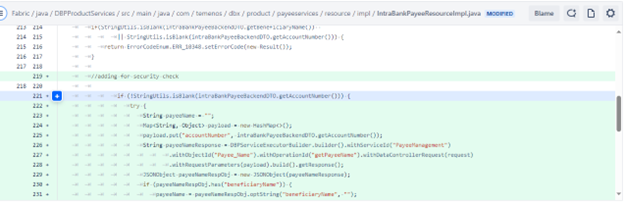
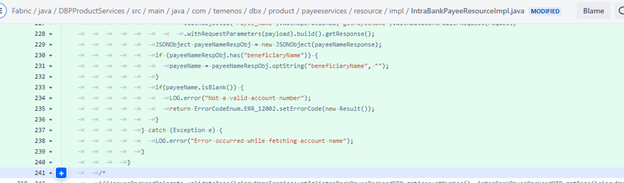
As shown in the above image, add the following piece of code in the method createPayee, from line number 219 to 240.
//adding for security check

if (!StringUtils.isBlank(intraBankPayeeBackendDTO.getAccountNumber())) {
    try {
        String payeeName = "";
        Map<String, Object> payload = new HashMap<>();
        payload.put("accountNumber", intraBankPayeeBackendDTO.getAccountNumber());
        String payeeNameResponse = DBPServiceExecutorBuilder.builder().withServiceId("PayeeManagement")
                .withObjectId("Payee_Name").withOperationId("getPayeeName").withDataControllerRequest(request)
                .withRequestParameters(payload).build().getResponse();
        JSONObject payeeNameRespObj = new JSONObject(payeeNameResponse);
        if (payeeNameRespObj.has("beneficiaryName")) {
            payeeName = payeeNameRespObj.optString("beneficiaryName", "");
        }
        if(payeeName.isBlank()) {
            LOG.error("Not a valid account number");
            return ErrorCodeEnum.ERR_12002.setErrorCode(new Result());
        }
    } catch (Exception e) {
        LOG.error("Error occurred while fetching account name");
    }
}
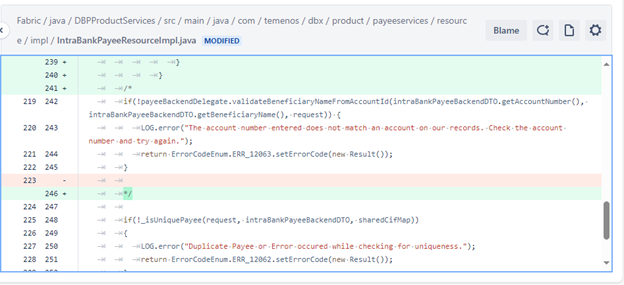
As shown in above snippet, comment the following code, from line number 242 to 245,
/*
        if(!payeeBackendDelegate.validateBeneficiaryNameFromAccountId(intraBankPayeeBackendDTO.getAccountNumber(), intraBankPayeeBackendDTO.getBeneficiaryName(), request)) {
            LOG.error("The account number entered does not match an account on our records. Check the account number and try again.");
            return ErrorCodeEnum.ERR_12063.setErrorCode(new Result());
        }

        */
Along with this replacement also add the import statement : import com.dbp.core.fabric.extn.DBPServiceExecutorBuilder;
In this topic